Who built Diceify, and why
Diceify is a free, browser-based dice art generator that turns a photo into a buildable black-and-white dice pattern with exact dice counts and a step-by-step builder. It was built by John Mikhail, a dice-art maker, in 2020.
The founder
I'm John Mikhail. Diceify started during COVID in 2020, when I wanted to make a dice portrait of Umm Kulthum, the most famous Egyptian singer of all time. The tools I found gave me no real control: no sharpness adjustment, no proper black-and-white option, just converters that spat out a pattern and left the rest to me.
Building the piece was the harder part. I would look down to pick up a die, look back at the pattern and lose my place: which row, which column? A run of ten 5s in a row would turn into “was that seven or eight?” and a recount. I spent more time finding my place than placing dice.
So I built the Builder: a follow-along interface that highlights the current position, tells you which die to place and how many of the same value come next, and tracks your progress. The generator around it is the result of wanting those controls myself. The full story is in Why I Built Diceify.
The Umm Kulthum build
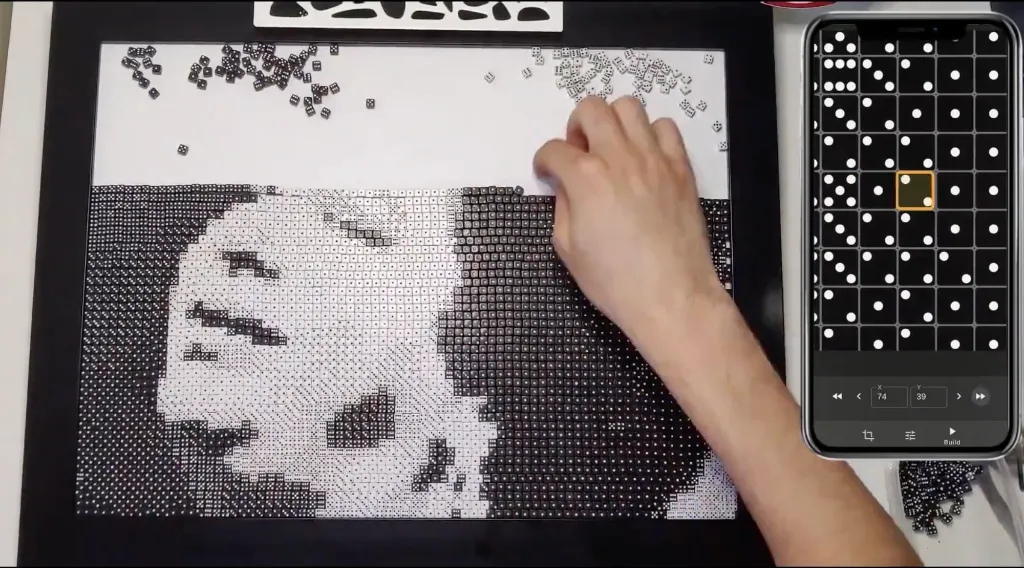
I arranged the dice dry and then poured the adhesive over the top, which is faster than gluing each die but risky: a top layer that is not clear enough, or that forms bubbles, can spoil the whole piece. It happened to me, so test your adhesive on a small area first. The video shows the build from start to finish.
How the generator works
Everything runs in your browser. The pipeline is deterministic, so the same photo and settings always give the same pattern:
- The cropped photo is converted to grayscale.
- It is shrunk to your grid (20 to 120 rows; the width follows the crop) by averaging the exact area of pixels each die covers, so a low-resolution photo works fine.
- An optional sharpening pass makes edges, like eyes and hairlines, stand out.
- Gamma brightens or darkens the midtones, and contrast stretches the range.
- Each cell's brightness is matched to one of 12 shades: black dice showing 1 to 6, then white dice showing 6 to 1. Black-only and white-only modes use 6 shades.
- Optionally the 6, 3 and 2 faces are marked for a 90° rotation, so their pips line up.
The result is a grid with the exact number of black and white dice, which the builder then walks you through row by row. The engine is open about its math: the dice art guide explains the shades, dice counts and sizes.
What is free and what is paid
The Explorer plan is free and needs no sign-up to try: generate a pattern from any photo, tune it, preview and share it, and use the builder for the first 5 rows. Signed-in users can save unlimited projects.
The Creator Pass is a one-time $19 for 30 days of full access: the builder for every row and full-resolution SVG blueprints. It does not renew. Studio is the same access as a subscription, $9 a month or $36 a year, for people who make several pieces. See the pricing.
Your photos
The dice pattern is generated on your device. If you are not signed in, your draft stays in your browser. A photo is uploaded to your private project only when you sign in and save it, so you can open it on another device. Details are in the privacy policy.
Get in touch
Questions, bugs or a build you want to show off: email support@diceify.art. Builds from the community are shared on:
Try it on a photo
Upload a photo and see it as a buildable dice pattern. Free, no account required.
Start creating